


Video Downloader & Player
4.6209.00 Reviews
App Specs
- Version
- V2.2.3
- Updated On
- License
- Free
- Downloads
- 5,000,000+
- Developer
- Dakwah Media
- Categories
- Video Players & Editors
- Platform
- Android, iOS
Screenshots
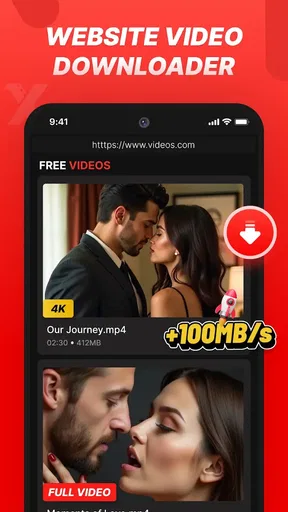
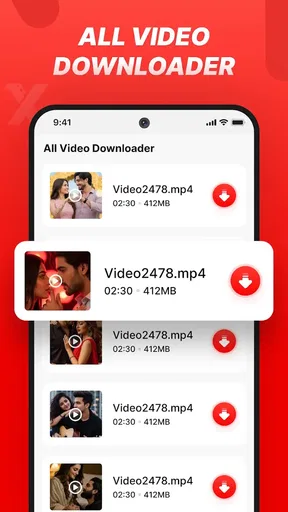

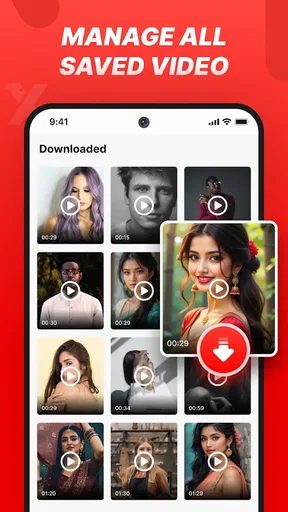

 Analysis by AppCompare
I judge a video app not only by how quickly it saves a clip, but also by how comfortably I can find and watch it afterward. Video Downloader & Player combines downloading with playback, so its appeal is practical: it can help turn a link into a video you can keep handy. In my view, that combination is most useful when you already know what you want to save and prefer a simple route from link to library.
Readable navigation matters more than a crowded feature list
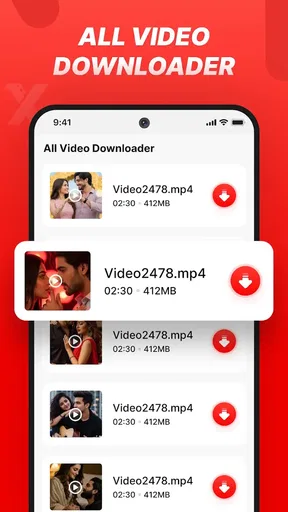
The first hurdle in a downloader is often not the download itself; it is understanding where to begin. The workflow described for this app is familiar: copy a video link, paste it into the app, and start from there. That is easier to follow than a tool that makes you hunt through several menus before you can act. I would still take a moment to learn where saved clips and playlists appear, because a clear first step is only useful if the resulting files are easy to find.
The interface is presented as clean and approachable, which should suit people who do not want to learn a complicated media manager. That does not automatically mean every label will be easy for every reader to interpret. If you have difficulty with small text or dense screens, try the main link-to-download path first and see whether the controls remain comfortable to read on your device. I would avoid assuming that a simple layout is the same as a specialized accessibility design.
Different abilities, different ways of using a video library
For motor comfort, a short copy-and-paste workflow can be easier than repeatedly navigating nested options. It may also be more demanding for someone who finds switching between apps, selecting text, or accurately tapping small controls difficult. A practical tip is to copy the link before opening the downloader, then paste it once, rather than moving back and forth between screens while trying to remember where the link came from.
Playback speed can be useful for more than saving time. I like the idea of slowing a spoken clip when I need to follow a fast explanation, or speeding through familiar material when I am reviewing it. That said, speed adjustment is not a substitute for captions, transcripts, or other support for different hearing and learning needs. Anyone who relies on those should check whether the videos they plan to keep already offer the format they need.
There is a similar trade-off for sensory comfort. Watching a saved video can avoid interruptions caused by an unreliable connection, but the app cannot make every source clip visually or acoustically comfortable. I would use the player for content whose sound and presentation I already know, and adjust my viewing environment rather than expect a downloader to solve issues in the original video.
When offline access helps—and when it does not
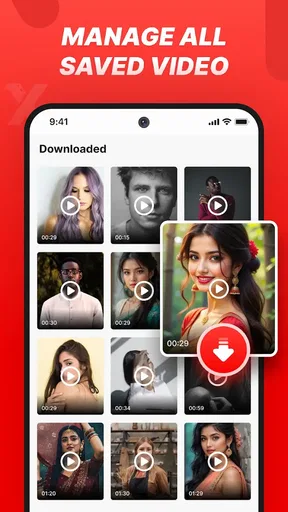
A realistic use case is finding a useful demonstration while connected, saving it, and returning to it later when the connection is poor or unavailable. That can be handy for a cooking step, a craft technique, or a short lesson you want to replay at your own pace. Playlists give that material a more deliberate home than a long, mixed camera roll, especially if you separate clips by task instead of relying on memory.
Worth Reading Before You Choose

EA SPORTS FC Mobile 26 Is a Bigger Football Game, but It Takes Time

Flipboard Shows What News Apps Must Do Beyond the Feed

Switching to Android Auto Means Rethinking Your Driving Routine

Google Calendar Makes a Crowded Week Easier to Manage

Ludo King Makes the Most of the Minutes Between Plans

Baby Panda World Brings Quick Play to Modern Phones, but Its Game Library Feels Busy
Before building a collection, I would consider how much storage the videos may use and keep only the clips I expect to revisit. This is a simple but easy-to-miss trade-off: downloading reduces dependence on streaming at playback time, but it also means the files occupy space on the device. A small, purposeful library is likely to be easier to navigate than saving every interesting link.
It is also worth treating downloads responsibly. A convenient saving workflow does not mean every video is available for copying or reuse under its creator’s terms. I would save material only when I have the right to do so and keep personal offline viewing separate from reposting or sharing someone else’s work.
Where it sits beside streaming apps and dedicated players
Compared with simply keeping videos in a social app’s feed, a downloader-and-player approach is better suited to clips you want to find again without scrolling through posts. Compared with a dedicated media player, the advantage here is the link-to-library idea: you can bring saving and watching together rather than using one app to collect a file and another to play it. That convenience is the reason I would consider it, not a claim that it replaces every player or streaming service.
The distinction matters if your needs are more specialized. If you mainly watch a streaming service’s catalog, its own app is usually the more direct choice. If you manage a large collection with detailed library controls, a dedicated media player may suit you better. And if you need precise accessibility options beyond playback speed, I would compare those options before moving important viewing habits into this app.
Small habits that make the workflow smoother
I would use playlists with a clear purpose—for example, keeping reference clips apart from videos saved just for entertainment. That makes the library more useful when you are in a hurry and helps prevent a practical tutorial from disappearing among unrelated clips. It is a modest organizational choice, but one that becomes more valuable as the collection grows.
For a video you intend to revisit, I would test the full process with one clip first: copy its link, use the app’s download flow, locate the saved item, and play it from the library. This checks whether the source and your own routine work together before you invest time collecting more. The app’s format support may help when a particular file type matters, but I would not assume every source or format will behave identically.
People often want to know whether they can use a saved video without a connection, whether the app also plays the files, and whether it is approachable for a first-time downloader. Its player and download-focused design make those central use cases, while the straightforward paste-a-link process lowers the learning curve. I would still test the specific source you care about and confirm that the playback controls feel comfortable before relying on it for an important task.
What the app does well, and where I would be cautious
The strongest case for this app is a simple one: it brings saving, playback, and playlist organization into one place. Smooth playback and speed adjustment add practical value after the download is done, rather than leaving the file as something you have to manage elsewhere. Its clean presentation should appeal to people who want a focused tool instead of a complicated library system.
The limitations are equally worth keeping in mind. The link-based workflow depends on having a usable video link, and the experience can vary with the source. A playlist helps sort saved clips, but it is not the same as a fully featured catalog-management system. The app also cannot improve the accessibility or quality of the original video simply by storing it. Those are reasons to treat it as a useful companion, not a universal answer to every video need.
In the wider video-player and editor category, this app is specifically a downloader and player rather than an editing suite. I would not choose it when my main goal is trimming footage, adding effects, or producing a finished video. I would consider it when the task is narrower: save a clip I am allowed to keep, play it later, and organize a few favorites without adding extra steps.
Download, playback, and everyday fit
First off, using Video Downloader & Player is as straightforward as it gets. No rocket science here! Once you've installed the app, downloading videos from various platforms becomes a walk in the park. Simply copy the video link, paste it into the app, and voila! You're all set. The app supports multiple formats, which is super handy if you need the video in a specific type for your device.
All-in-One Media Hub
But wait, there’s more! This app isn’t just about downloading videos. It doubles up as a media player. So, once you've got your videos stored, you can watch them directly in the app. The player itself is quite intuitive, offering smooth playback and the ability to adjust playback speed. Imagine binge-watching your favorite clips at your own pace without any buffering issues.
User-Friendly Interface
The interface is clean and user-friendly, which is a big win for those who aren’t tech-savvy. Everything is laid out clearly, so you don't need to fumble around trying to find features. And if you're worried about security, the app has got you covered. It ensures that all your downloads are safe and sound.
Video Downloader & Player also includes an option to organize your videos into playlists, making it easier to access your favorites whenever you want. It's like having your own personalized video library right in your pocket.
Final Thoughts
All in all, if you're someone who frequently downloads and watches videos, this app is definitely worth checking out. Its ease of use, combined with its robust media player, makes it a standout tool for video enthusiasts. So, next time you find a video you love, give Video Downloader & Player a try and see how it transforms your viewing experience. You won't regret it!
Who I would recommend it to
Dakwah Media’s free app is aimed at people who want a straightforward way to save and watch videos, rather than edit them. It has a 4.6 average from around 8.3 thousand ratings, with over one million installs, so it has attracted a sizeable audience. The app is rated Teen, and its current version is 2.1.4; it was released on October 18, 2024, and requires Android 7.0 or later.
I would recommend giving it a try if you routinely revisit a small set of clips, want playback speed controls, or prefer playlists to a scattered camera roll. I would skip it if you mainly stream through subscription services, need a dedicated editing workflow, or depend on accessibility controls that are not part of the functions described here. My overall view is that its best use is focused and practical: collect a few videos you have permission to save, keep them organized, and return to them when it suits you.
Pros
- Supports multiple video formats effortlessly.
- Built-in browser for easy video search.
- Fast download speeds without interruptions.
- User-friendly interface with intuitive navigation.
- Allows background downloads while multitasking.
Cons
- Contains intrusive ads that can be distracting.
- Limited features available in free version.
- Requires permissions that may concern privacy.
- Occasional crashes on older devices.
- Incompatible with some streaming sites.
FAQs for Video Downloader & Player
What video formats does Video Downloader & Player support?
Video Downloader & Player supports a wide range of video formats, including MP4, AVI, MKV, and more. This ensures compatibility with most video files you may encounter, allowing you to download and play videos without the need for additional conversion software.
Is Video Downloader & Player safe to use on my device?
Yes, Video Downloader & Player is designed with user security in mind. It regularly updates to protect against potential vulnerabilities. However, it’s always advisable to download the app from a reputable source, such as the official app store, to ensure authenticity and security.
Can I download videos from all websites using this app?
Video Downloader & Player supports downloading from a large variety of websites, but it may not work with all due to certain sites having restrictions or protections in place. It’s best to check the app’s website list or user reviews to confirm compatibility with your preferred sites.
Does Video Downloader & Player require a subscription or payment?
The app offers a free version with basic features, but there may be in-app purchases or a premium version available. This premium upgrade typically provides additional features such as ad-free usage, higher download speeds, and support for more formats.
How user-friendly is the Video Downloader & Player interface?
Video Downloader & Player is designed with a user-friendly interface that caters to both beginners and advanced users. The app features intuitive navigation, clear instructions, and easy access to download and playback functions, making it simple to use for anyone.


